Posts

How to set up pywikibot

As part of managing a wiki , sometimes you need bulk action tools. The mediawiki tool for this is called pywikibot . This is how I set it up: python -m venv .pyb # activate the venv python -m pip install pywikibot This makes the command pwb available to use. We now have to teach it where the wiki is and what account to use. For this, we create a bot account on the wiki using the UI. Then, we come back and run this: pwb generate_family_file pwb generate_user_files As part of the user files command, give it the name of the bot created. Do not give any password. The password must be entered as part of the next command: pwb login At this point, there should be a scripts directory in the current working directory. However, the inbuilt scripts refuse to run because it can't find its i18n configuration. There are a couple of ways to grab it. One is to git clone it inside the scripts directory, as recommended here . However, before you can do so, you have to temporarily stash ...

Running Mediawiki in a Docker container, and restoring from backup

 Background A wiki for a game I play and that I contributed to went down a few weeks ago due to suspected DNS issues. The person who had registered the DNS wasn't able to (or was unwilling to) respond, so we felt as if a lot of our work was lost. However, a few people still had access to the hosting environment of the wiki, and I was able to take a backup of the entire home directory, which included some fairly recent database backups. Aside: Renewing a domain immediately  after  it has expired is quite expensive. Registrars charge an arm and a leg for missing your auto-renew, so it is good practice to not let your domains expire. The problem statement I decided to step in and get the wiki up and running again. It had to be on a different domain, since the original domain was -- for all practical purposes -- gone. I decided on the following objectives: Register a reasonable domain for not too much money Run Mediawiki in a docke...

Windows Task Manager is lying to you, and I don't know how to make it stop

Image
If you use Windows, you might be intimately familiar with Windows Task Manager, which has a performance tab that shows the utilization percentage of various hardware in your system. Today, we're looking at CPU utilization. It looks a bit like this: The problem is that the meaning of the word utilization is very tricky. There can be multiple meanings: At the current time, with the current settings, what fraction of time is it executing instructions vs lying idle? At any time, with the most optimum settings, this CPU could practically complete a number a instructions at a certain rate. What percentage of that rate is it currently working at? I think the Windows Task Manager is currently using definition #1 above. This is useful for a person to look at the graph and understand "is there a runaway process on my system that is pegging my CPU"? However, consider the alternate use-cases: I am trying to run a long-running program, am I getting my money's worth out of this CPU...

Setting coordinates in Phaser where the body and the sprite are offset from each other

Image
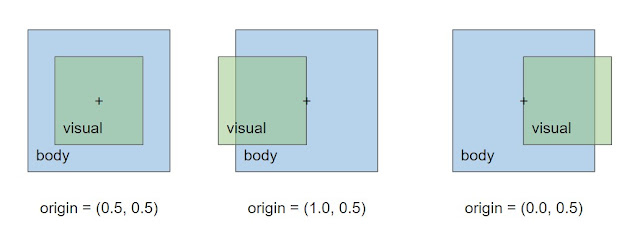
If you're using Phaser with matter physics , sometimes you might need to set a body of a different size from your sprite. That's pretty easy, simply by setting the width and height of the body. But if your physics body is offset from where the sprite is, then one has to use the setOrigin method to fix this. This can be tricky. This diagram might help explain how origin is used, where 'visual' is the sprite, and 'body' is the physics hitbox: And finally, if you do some algebra to find the origin, you can use the following code: // SPDX-License-Identifier: Apache-2.0 const visualX = 150; const visualY = 150; const visualWidth = 120; const visualHeight = 120; const bodyX = 200; const bodyY = 200; const bodyWidth = 180; const bodyHeight = 180; const originX = (bodyX - visualX) / visualWidth + 0.5; const originY = (bodyY - visualY) / visualHeight + 0.5; const sprite = this.matter.add.sprite(bodyX, bodyY, '...

Laptop Surprises: Lenovo Yoga Slim 7i

I recently bought a Lenovo Yoga Slim 7i (Model 14ITL05). I really like it. I am trying to write down everything that surprised me about the laptop in here. These are mostly things that did not understand about the machine from the product page on Lenovo when ordering. I'll start off with the pleasant surprises: There is some sort of radar sensor on the top on the screen, in the webcam area. When I come and sit on my chair in front of the laptop, it wakes the screen and then Windows Hello logs me in with face ID. This is great! There is a feature called Battery Conservation Mode . What it does is: it pauses charging the battery when it reaches somewhere between 55 and 60%. So you can get the full performance out the CPU without adding a lot of wear on the battery. It allows the CPU to go to full performance with all the wattage coming from the AC adapter without worrying about battery wear. However, I would like to know more about this, and exactly why the battery percent...

How not to make customers happy

Image
I recently moved to Bangalore and subscribed to Vodafone. About a week and a half into the subscription, I get this SMS at 5:45 am, clearly designed to be as missable as possible. I hadn't subscribed to any such service. This seems flat out illegal. Anyway, I followed the message and immediately sent a STOP to the number. What followed is a hilariously intentionally vague UX: What do you have to respond? I was almost tempted to respond with "1, 2, 3" but instead did the 'logical' thing and punched in 1. I got a confirmation that it has been disabled. I have no idea what the silk service is, or whether I will be charged for it in my next bill. Let's see. EDIT: They did charge me for it, but I was able to call customer service and reverse the charge. It turns out that the imgur app for Android was injecting bad ads in the background that signed up the device for these things. My suggestion: do not use the imgur app on vodafone mobile data.

Trouble installing KB2881553

EDIT: The error is back :( These instructions did not help. EDIT 2: The error is mysteriously gone :) I think Microsoft did some magic on their end. I am back on automatic updates! For a long time, I was having trouble installing KB2881553: Update for the English Input Personalization Dictionary on Windows 8.1. These are rough notes on how I resolved it . The problem: KB2881553 is supposed to be only offered on machines that have a touch keyboard with lots of usage. I think it was offered on my desktop accidentally, because I also use a tablet PC with touch on the same Microsoft Account. If you hide the update, it doesn't go away, because a new version of the file is offered on Windows Update within a few days, on the same KB number. The error code was 6B2. The solution: I was mostly guided by this very helpful post . The gist of the problem is that the previous update .msi cannot be found, so you have to convince Microsoft that either (i) your package is up to...

Dark Fonts and Colors for light theme in VS 11

Image
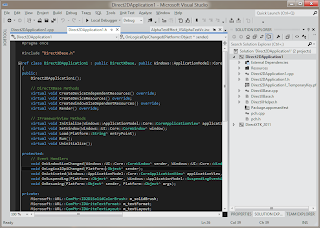
Update: The VS 2012 Color Theme editor has a lot more options and subsumes the functionality of this settings file. Check it out! ——————————————— Visual Studio 11 comes in two themes: dark and light. I like how the code looks in the dark theme (since it is easy on the eyes), but I like how the menus and toolbars look in the light theme (the buttons look sufficiently different from each other.) So if you want to use the colors and fonts of the dark theme with the light theme UI, you would think you could just export out the fonts, change the theme, and import them back in. However, this has the bizarre side effect of causing all the fonts to become bold. So I went into the theme file and manually changed all the BoldFont="Yes" invocations, and finally I have a theme I like. You can download this settings file if you like, it has only the Fonts and Colors, so it should not mess up any of you...

Rhyming Harry Potter kweezz

A long time ago, I had made a Rhyming Harry Potter kweezzz. It was archived on kweezzz.com, but it has since been domain squatted. So I decided to post it here for safekeeping, thanks to archive.org for the data. Theme: Harry Potter Rhyming Quiz (All questions will rhyme, the answers may or may not) Date: 16th Oct, 2010 Kweezzz-master: @sushovande

Don't let Google track your entire browsing history

So Google has recently publicized the "+1" button for websites, which "competes" [1] with the Facebook [Like] button and the Twitter tweet button. This is a much more worrisome phenomenon than we give it credit for. Notice how the Facebook like button is instantly able to tell you which of your friends have liked that page? That is because Facebook is able to correlate your Facebook login with every page you visit. In order to see if any of your friends have liked that page, Facebook has to correlate the URL to your friend list. So even if you haven't clicked [Like], even if none of your friends have clicked [Like], just to be sure of that fact, Facebook will send the URL and your Facebook login to its servers, building up your entire browsing history. And now Google has done it. Twitter did it even before Facebook. I implore you, do not let these corporations track you everywhere you go. This will only end badly. Fortunately there is an easy fix. Add...

How to import facebook birthdays to your WIndows Phone calendar

Step 1: Use the Birthday Exporter facebook app http://apps.facebook.com/ical_exporter/ Step 2: Save the ICS file that it generates Step 3: Open up the ICS file in a text editor. Preferably one that can record macros. To each VEVENT entry in the ICS file (demarcated by BEGIN:VEVENT and END:VEVENT ) add the following two tags: X-MICROSOFT-CDO-BUSYSTATUS:FREE TRANSP:TRANSPARENT Step 4: Go to the Windows Live Calendar that is linked to your Windows Phone account. Click on “Subscribe”, click “Import from an ICS file” and then import the file into your calendar. Step 5: Wait a while. Your calendar on the phone will reflect the new entries shortly   Note 1: Step 3 is important, otherwise you will be shown as busy on the calendar, and windows phone will report conflicts on the calendar (shown with two arrows pointing towards each other diagonally) Note 2: Currently windows phone only syncs the primary calendar of the live id. If you don’t want to mess up the primary calendar, creat...

Sometimes programs delight you

So I bought an Xbox controller for the PC, and plugged it in while Mafia II was running. It installed the drivers, and as soon as I pressed a button on the controller, it instantly responded, the on-screen menu items changed to reflect the new control scheme, and force feedback started working. It’s some of these experiences that keeps one interested in engineering and inspires one to bring a bit more joy to people’s lives.

Undeletable folders on Windows 7 after move (part of library)

So the other day I was doing regular housekeeping on my Win 7 desktop, and I was moving stuff around, to make space for all these games I acquired from the steam sale. I move the “Movies” folder from drive G to drive S. The move completes, but there is still a Movies folder in my G drive. I can’t open it. I can’t takeown it. I can’t icacls it. And I am an admin. Turns out – that folder was referenced from a library (the videos library). I opened the video library, clicked on the (8 locations) link, and removed the G:\Movies from the list. Poof! the folder vanished.

Importing contacts from iPhone to Windows Phone 7

So you moved from an iPhone to a Windows Phone 7. How do you move your contacts over? Step 1: Sync your iPhone to your computer, and make sure you sync your contacts (look under data or information in iTunes). Exporting to Outlook or to Windows Contacts would work best. Step 2: If using outlook, go to contacts and export all the contacts to CSV. If using Windows Contacts, go to your Contacts folder on your computer, and hit the “Export” button in the toolbar, and save as CSV. Be SURE to export the Mobile number , which is not selected by default. Step 3: Browse to contacts.live.com, and sign in using the same live id your Windows phone is tied to. Click Manage, then click “Import”. Click Outlook, and then import the file you created earlier. You’re done! The contacts you just added will appear on your phone within the next 30 mins (by default). Update: It appears that there is no easy way to export the phone numbers marked as "iPhone" in your iPhone contacts. Will update if ...

SQLite on iPhone

It seems that many of the internal stores on the iPhone are actually SQLite databases. The database that stores your text messages are located in /private/var/mobile/Library/SMS/sms.db and can be manipulated with any SQLite client. Similarly, Voicemail database is located at /private/var/mobile/Library/Voicemail/voicemail.db. That same folder also contains all your voicemail audio files, so you can back them up too, if you want.

Using powershell to batch rename some files

Now that powershell comes pre-installed on all copies of Win7, we can use it to perform day-to-day tasks. Here is the first tip: to batch rename a bunch of files, such that the first 3 characters are deleted from the filename, issue the command: dir | foreach -process {mv $_.Name $_.Name.Substring(3)} Update: I will be updating this post with more snippets as I come across them 1. Here is how to create a graphics object in powershell, and draw a bunch of lines on it. $bmp = new-object System.Drawing.Bitmap(264, 264) $graphics = [System.Drawing.Graphics]::FromImage($bmp) for($i=1; $i -lt 9; $i+=1) { $graphics.DrawLine($pen, 33*$i, 0, 33*$i, 264); } 2. Here is how to set the current directory so that .NET objects know it [Environment]::CurrentDirectory = $pwd 3. Here is how to download a file $c = new-object System.Net.WebClient $c.DownloadFile( url, filename ) 4. Concatenate a bunch of files together cat misc*.txt | Out-File allmisc.txt -Encoding ASCII or cat misc1...

Dark background for VS 2010

Image
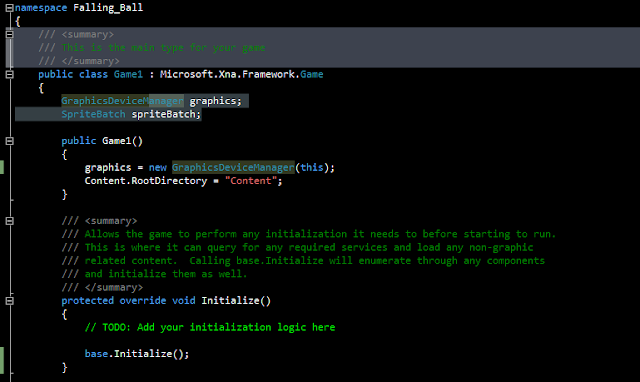
Now that Visual Studio 2010 is out, you obviously need a dark background for it. The problem with other dark backgrounds out there is that they change too much - for me, if comments aren't green the universe pretty much collapses. So here is a 9KB settings file which will simply change the background of your text editor to black, keeping keywords blue and comments green. Certain other elements' colors were changed to match. Enjoy, and leave a comment if you found it useful. OnlyFonts_2010.vssettings

Compiler restrictions are no match for natural oversight

You'd think that with the restrictions in Java / C# that the only things you can put in an 'if' block be bool's, you'd avoid all kinds of single equals sign vs double equal sign errors, but look at what I ran into today: bool IsGood = false; bool IsSupposedToBeGood = false; if (IsGood = IsSupposedToBeGood && otherConditions) {     // do something assuming IsGood is IsSupposedToBeGood } Sigh.. if the quantities you are checking equality for are bools, you're out of luck. I guess I can't let my guard down in C# / Java either, now.

My last post from kgp

Well... this is kinda it. Four years of partying is nearly over. It seems weirdly normal, like it is not even real that I am probably never going to come back to kgp in my capacity as a student. kgp gave me so many things I will never forget. The main problem is most of these thoughts are buried so deep in emotion that they can't be expressed here. So, 20-year-older-me: don't be disappointed that you can't use this page to reminisce about your alma mater - you couldn't have done it anyway. I'll never forget you - not the sunlit days, nor the moonlit nights.

How to make Vista style icons

Image
Normally I don't blog just to link to another page, but this tutorial on Creating a Vista Style button template is just so compelling, that I gave in. Here is a sample of what you can make. I am still working on a rounded highlight. (I used Photoshop CS3, by the way)